Day Trading Journal App
TradeJournalingApp is a day trading journal app for iPhone and Android. Record every intraday trade with its time, size, fees and reason. Then see which hours, setups and habits make you money and which ones drain it. Your journal stays on your phone, with a daily loss limit that steps in before a red morning turns into a red week. Free to download.


What Is a Day Trading Journal App and Is It Worth It?
A day trading journal app is a mobile app where you record each trade you open and close within the same day, then review what those trades add up to. It keeps the facts of every trade (time, entry, exit, size, stop and fees) next to the reason you took it and how you felt. Then it turns all of that into numbers you can act on.
Some traders call it an intraday trading journal. The idea is the same: one record of every trade you open and close in a day.
A swing trader might log five trades a week. A scalper can take five before the coffee goes cold. That pace changes what a journal has to do. It must log a trade in seconds, count the fees on every one and split your results by hour. It also has to keep score of the day itself: how many trades you took, how much you lost and whether you stopped when you said you would.
To help you tell your intraday results from the rest, TradeJournalingApp lets you tag each trade as Scalping, Intraday, Swing or a style of your own. Your reports then show what each style earns you.
Image a Tuesday where you're up $180 by 10:15 and down $40 by lunch. Your broker statement lists twelve fills. It won't tell you that the last four came straight after two losses in a row, each one bigger than the one before. But a journal will. After a month, the pattern stops being a hunch and becomes a figure. Maybe your trades after 11:30 lose money. Maybe your third loss in a row is usually followed by your biggest one.
So is a day trading journal worth it? For most day traders, yes, because the costly mistakes repeat. A journal won't make you profitable on its own. It shows you the truth sooner, while the lesson is still cheap. Most day traders lose money (see the 97% question below), so it pays to know early what your own numbers say.
What You Can Do With the Day Trading Journal App
TradeJournalingApp is built for that pace: many trades, tight limits and little time between them. Each trade logs its entry, exit and risk. Tags track your setups and emotions. Reports then spot the patterns behind your mistakes so you can cut them. Here's what that looks like in the app.
Log a Trade in a Few Taps
Tap + on any main screen. Pick the instrument, direction, prices and size, then save. Net P&L after fees, return % and R update as you type. No exit yet? The trade saves as an open position. Press and hold the app icon to jump straight to Log a trade.
Import Your Broker's Fills as Whole Trades
Busy session? Import the day's broker file at the close. TradeJournalingApp reads MetaTrader 4 and 5 statements, CSV and Excel files. It blends single fills into one position with a true average entry and exit, so scaling in and out doesn't wreck your win rate. Step-by-step export guides cover MetaTrader 5, MetaTrader 4, Binance, Interactive Brokers, Charles Schwab, Webull, NinjaTrader, Zerodha, Groww, Upstox, Angel One, Dhan, KuCoin and Coinbase.
You pick the time zone the file was written in, so each trade lands on the right day. Duplicates come up unticked. You can undo any import in one step. For crypto, connect Binance, Bybit or Bitget with a read-only key. New trades then arrive with their fees and funding while the app is open.
Stop at Your Daily Loss Limit
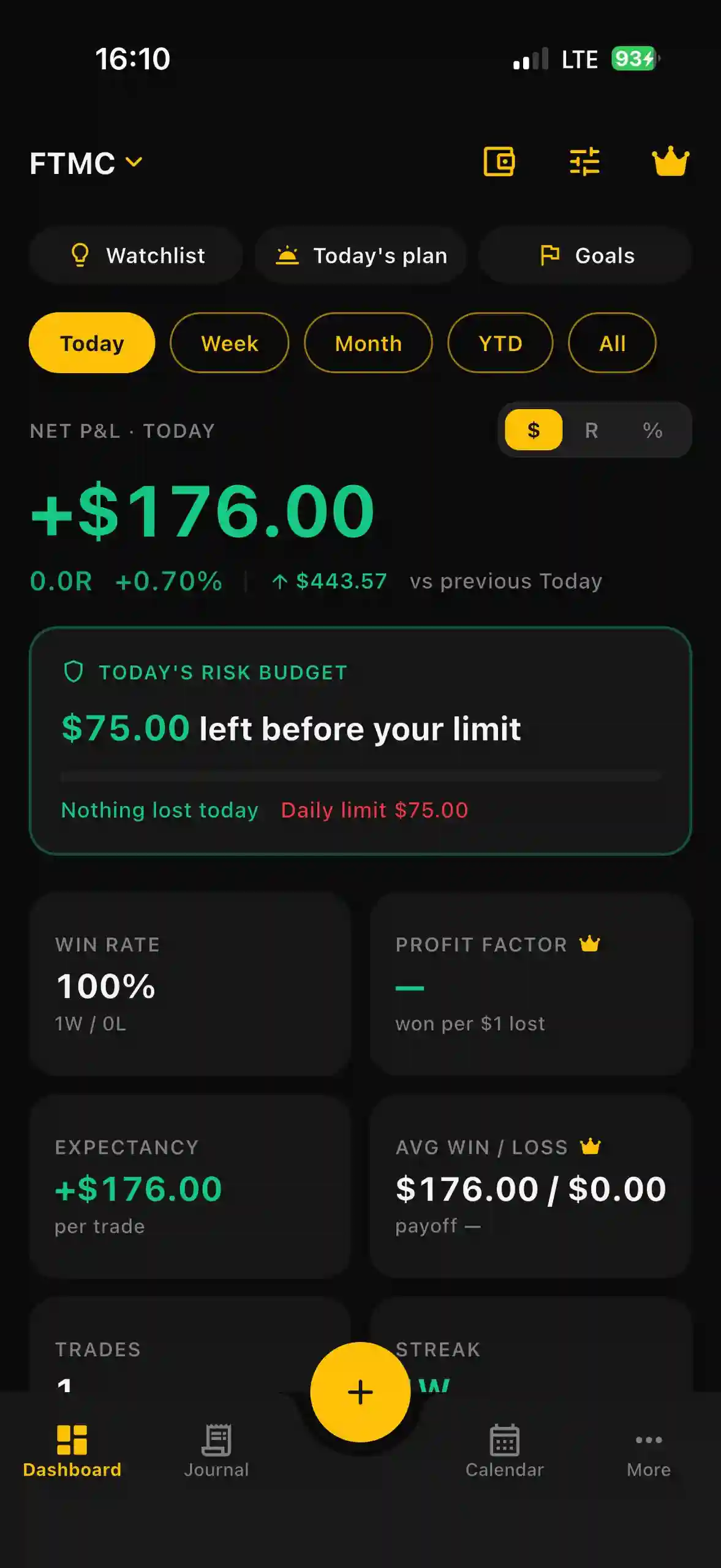
Today's risk budget on the dashboard shows how much of your daily loss limit is left. The bar turns amber at half used and red at 80%. Your phone buzzes when you hit the limit. Trading a prop firm challenge? Keep it in its own account with its own balance and stats. Set your maximum loss a little inside the firm's daily limit, so one slipped stop doesn't end the challenge.
Six rules watch today's trades: max trades per day, daily loss cap, consecutive losses, max risk per trade, minutes between trades and size increase after a loss. Each one can log quietly, warn you or interrupt you with a cool-down screen before your next entry. One tap sets up three to start with: a five-trade daily limit, a three-loss stop and a fifteen-minute gap after a loss.
Plan the Day and Review It
Today's plan holds your limits, your bias, the news you'll sit out and a pre-market checklist. Spot an idea before the entry? Put it on the Watchlist with its entry, stop and target, then turn it into a trade with one tap. After the close, the Daily Rewind puts that plan next to what happened. A review queue lists every trade still waiting. One short question and an A to F grade close each one out. The grade rates how well you followed your plan, not whether you won.
Nudges on the dashboard appear only when something needs you, such as a trade without a stop. The Discipline page shows no P&L at all. It scores your habits from 0 to 100, tracks your journal streak and shows how much of your profit came from your single best day. Goals update themselves from your trades. The P&L calendar colours each day by its result. Its year view adds your longest green run and your best and worst month.
See Which Hours and Setups Pay You
13 ready-made reports split your results by hour, session, weekday, setup, emotion and mistake. They show your streaks, how much of each move you keep and what fees take from your profit.
To score your setups, write each one down as a strategy with its entry rules, exit rules and what invalidates the idea. Start from the Breakout, Trend pullback or Mean reversion template. The Tags & setups report then shows what each setup earns and what each mistake costs. See the seven questions your reports answer.
Get the Right Tick Value and Trading Day for Every Market
TradeJournalingApp comes with close to 100 instruments already set up with their contract size and tick value, including forex pairs, metals, index CFDs, crypto pairs and index futures such as ES, MES, NQ and MNQ. Search more than 11,000 stocks across 67 exchanges. Missing one? Add your own instrument with its tick size and point value.
Then set the hour your trading day rolls over, with presets for midnight, the futures open at 18:00 and the Asia open at 17:00. An evening futures trade or a late-night crypto trade then lands on the right day.
Keep Your Journal Private, Backed Up and Easy to Share
The trade data you enter is stored on your phone and isn't sent to our servers or our partners' servers. There's no sign-up. Lock the app with a passcode, Face ID, Touch ID or your fingerprint. Hide every money figure when someone looks over your shoulder.
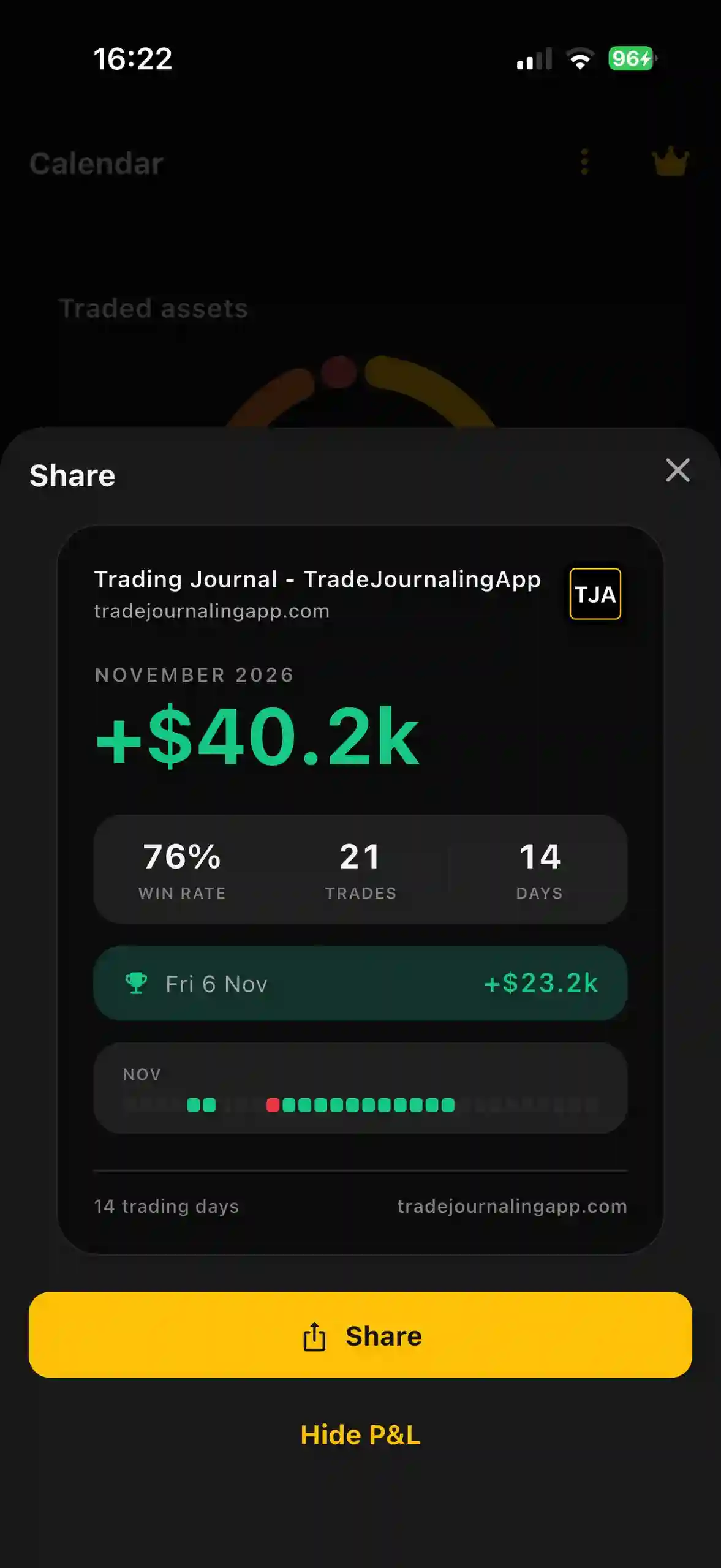
Save the whole journal to one backup file with an optional password. Export your trades to CSV or Excel for your computer or your tax software. Build a PDF report for any period and send it to a mentor or a prop firm. Share a picture of your month from the calendar, with the money amounts hidden if you prefer. Read more about how your journal stays on your phone or the full Privacy Policy.
How a Trading Day Works in the App
Here's how those features fit into one trading day. These four steps show how to keep a day trading journal in TradeJournalingApp, from the open to the weekly review. Each step takes minutes. Together they make your day trading journal process: plan, trade, review and improve.
1. Set Today's Limits Before the Open
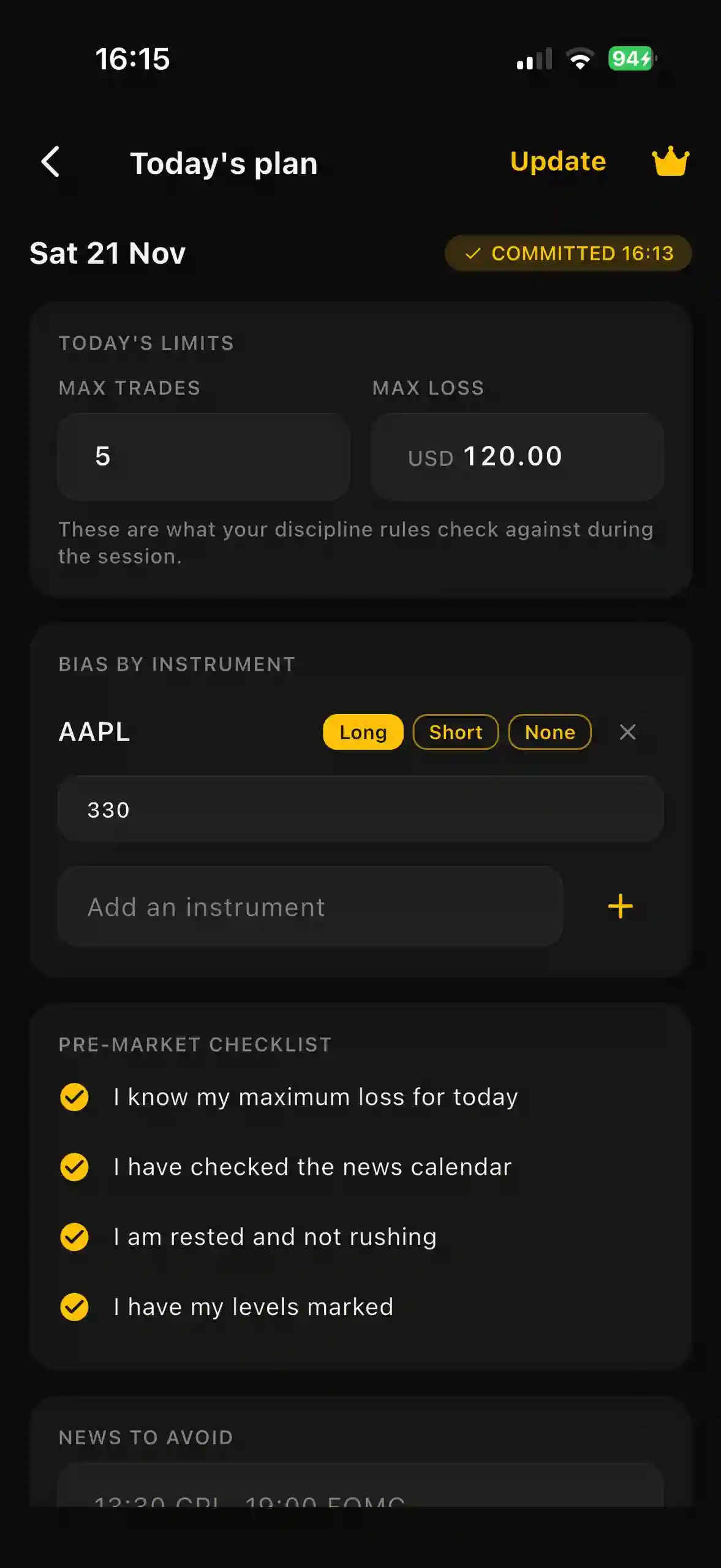
Open Today's plan before your first trade. Set your maximum number of trades and your maximum loss. Mark a long, short or no bias for each market you watch, with the levels that matter. Note the news you'll sit out, such as CPI or FOMC, with its time.
Then tick the four pre-market checks: you know your maximum loss, you've checked the news calendar, you're rested and you have your levels marked. Need levels? The free pivot point calculator gives you today's support and resistance from yesterday's candle.
Pick the setups you plan to trade and note how you feel. In the evening, the Daily Rewind shows both back to you. Commit the plan and it counts toward your journal streak. Before each entry, the position size calculator works out your size and always rounds down, so you never risk more than you set.
2. Log or Import Each Trade After You Exit
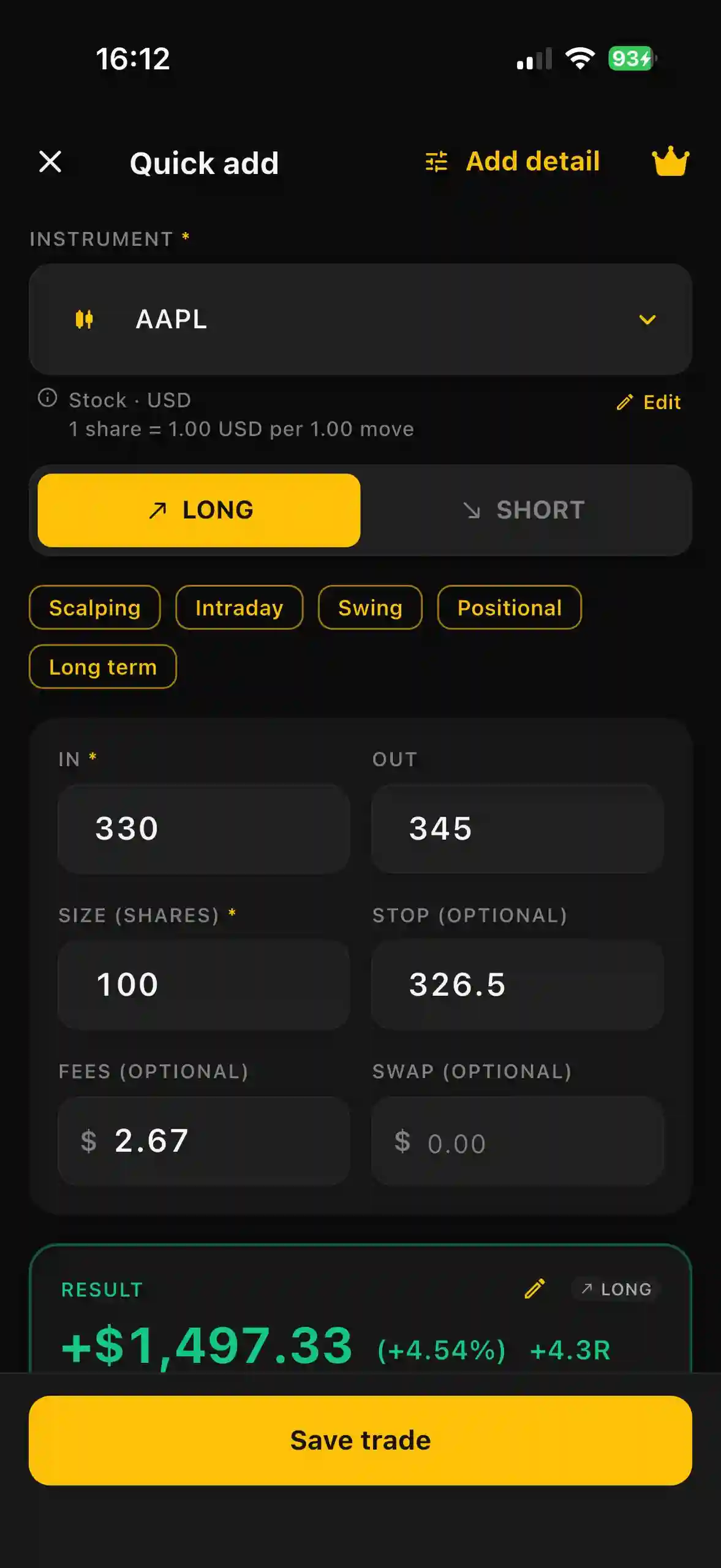
Close the trade, then tap +. Pick the instrument, direction, prices and size. Net P&L, return % and R appear as you type, with fees and commission taken off. Add the setup and how you felt, attach the chart, then save.
Busy session? Skip the typing and import your broker's file at the close. A crypto exchange connection brings trades in on its own. Still holding something at lunch? Mark its current price to see your open P&L and how close it sits to its stop.
3. Close Out the Day With the Daily Rewind
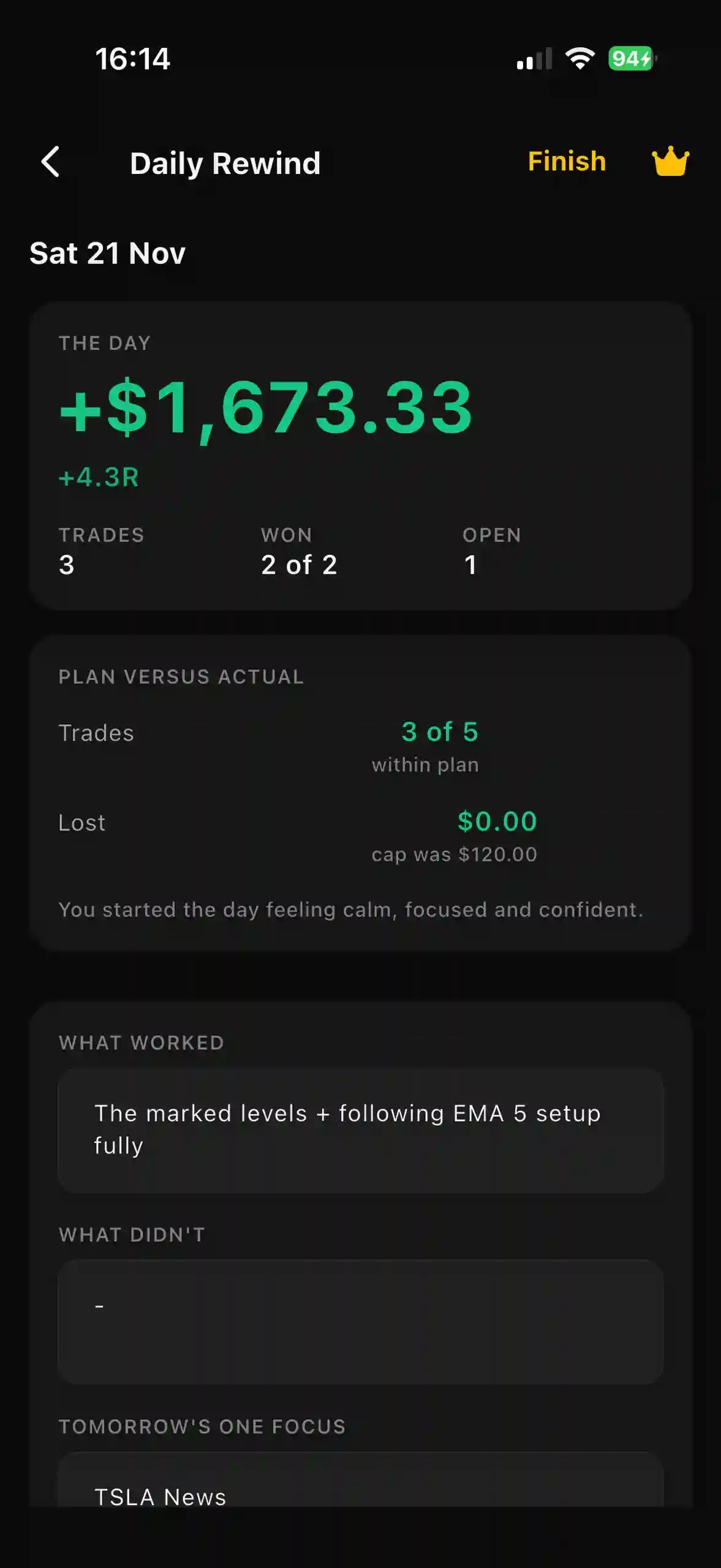
When you stop trading, open the Daily Rewind. It shows the day's result, then puts your morning plan next to what happened: trades taken against your maximum, your loss against your cap and whether you traded the setups you planned. Mark each rule as kept or broken. Write what worked, what didn't and one focus for tomorrow, then grade the day from A to F. It takes a couple of minutes.
Any trade still waiting for a review sits in the review queue. Answer its one short question and grade the execution while you still remember it.
4. Review the Week Before the Next Open
Once a week, open the weekly review. It adds up your net result, win rate, expectancy and fees, compares them with the week before and lists your five most expensive mistake tags. Its discipline check counts the trades you reviewed, the trades without a stop, the stops you moved and your average grade. Write one focus for next week and save it. Then open the Period comparison report to see whether this week beat the last one.
Goals keep your trading process pointed somewhere. Pick what to measure, such as net P&L, trades taken, days journaled or green days, then a target and a period. Each goal updates itself from your trades and shows whether you're on pace. A loss floor goal keeps your losses under a set number for the period.
What Your Day Trading Journal Shows You
Keep that routine for a few weeks and your journal starts to answer real questions. A pile of trades isn't the goal. Answers are. Each of these seven questions maps to a report or screen in TradeJournalingApp. Every report reads in money, R or percent for any date range.
Which Hours and Sessions Pay You?
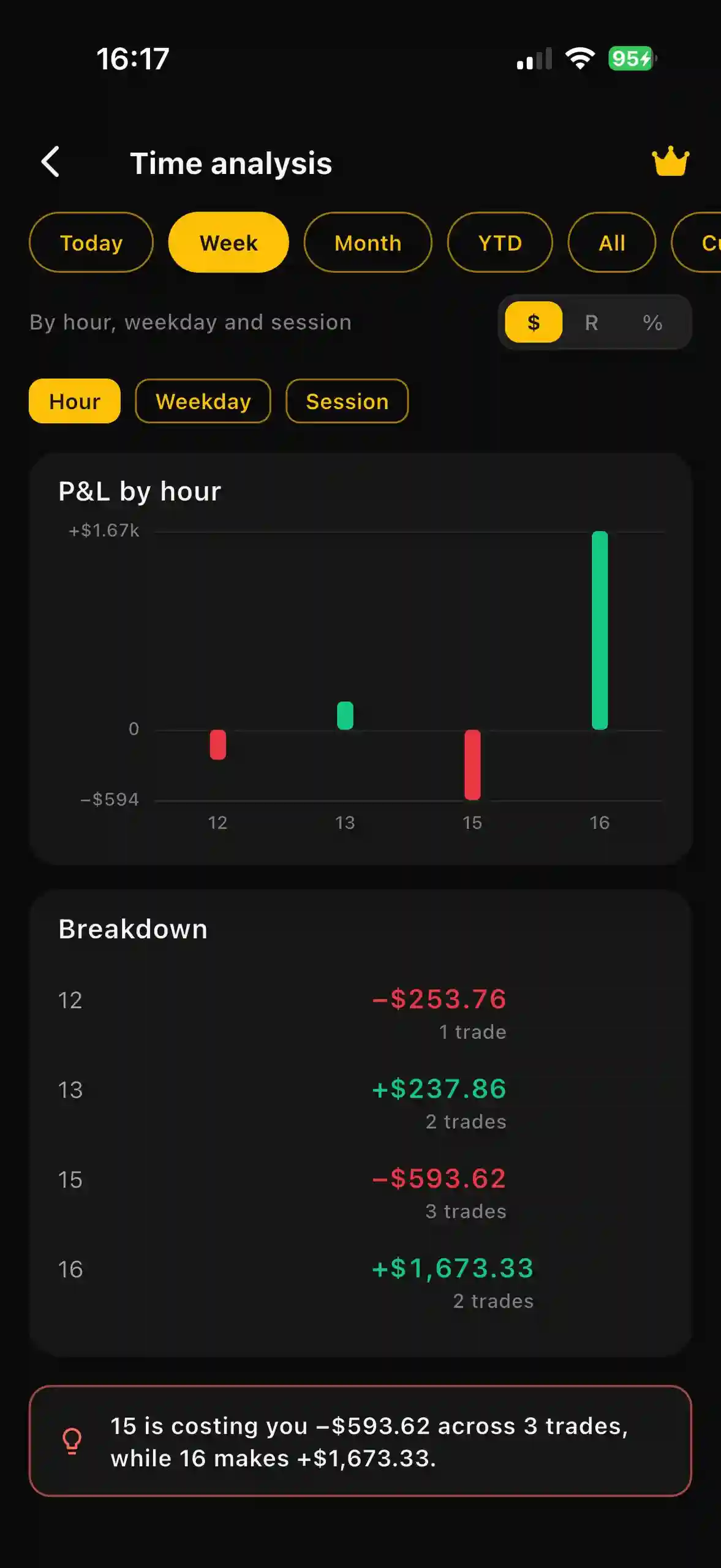
Your edge probably isn't spread evenly across the day. The Time analysis report splits your results by hour of the day and day of the week. Its session view shows Asia, London, the overlap, New York and after hours. If your afternoons keep losing, the fix might be as simple as closing the app at noon. The session clock shows Sydney, Tokyo, London and New York on one dial in your local time, so you always know which session you're in.
How Many Trades a Day Is Too Many?
The number is personal. Your journal finds it. Open any trade and the app shows whether it was your first, second or fifth of the day and what the day's P&L was before you took it. Look back over a month and you'll often see the point where your results turn. Once you know your number, set a Max trades per day rule. When you go past it, the app logs it, warns you or stops you with a full-screen pause.
How Do You Trade After a Loss?
Two losses in a row. Then the third trade comes faster and bigger. Most day traders have fallen into revenge trading at some point. The Streaks & consistency report compares how you trade straight after a win with how you trade straight after a loss.
Two rules catch it live. Minutes between trades trips when you open a trade too soon after a loser. Size increase after a loss trips when you size up past your chosen multiple. Set either one to interrupt and a full-screen pause with a 60-second breathing guide appears before your next live trade.
Which Emotions Cost You Money?
Trading psychology sounds vague until you measure it. Fear, greed and FOMO never appear on a broker statement. They show up in your results once you write them down. Tag each trade with how you felt, such as Calm, Anxious, FOMO or Tilted. Add what the market was doing, such as Trending or Choppy. The Tags & setups report then shows what each emotion costs you. If your FOMO trades lose money month after month, you've found your next rule.
How Much of the Day's Peak Do You Give Back?
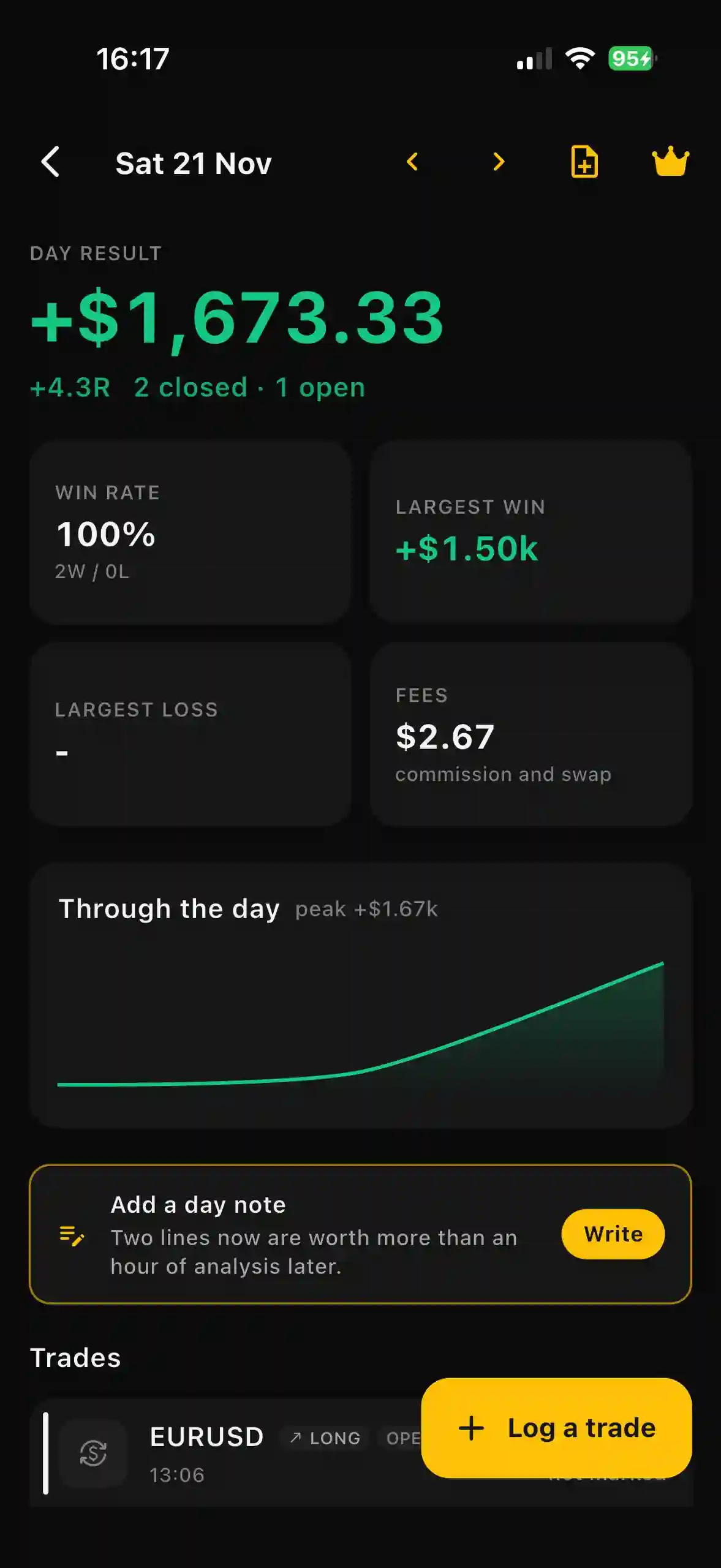
Up $300 at 10 a.m., up $40 at the close. That's a green day on paper and a bad one in practice. Open any day from the calendar and the day page draws your running P&L trade by trade, with the day's peak and how much you gave back from it. If the give-back shows up week after week, make it your one focus and check it in every Daily Rewind.
How Much of Each Move Do You Keep?
Log the best and worst price a trade reached while it was open. Traders call these the MFE and MAE: the maximum favourable and maximum adverse excursion. The trade page then shows how much of the move you caught and how much heat you sat through. The Execution efficiency report turns your MFE and MAE into execution metrics: how much of each planned move you captured, how often you reached your target and how often you scratched. If price keeps running well past your exits, your exits need the work, not your entries.
How Much Do Fees Take From Your Profit?
Fees look tiny one trade at a time. Twenty trades a day at $4 a round trip is $80 a day, close to $1,700 over a 21-day month. The Fees & costs report shows what trading costs you in total, per trade and as a share of your gross profit, split into commission, swap, exchange fees and the rest. If that share keeps climbing, fewer trades may help more than a new setup.
These seven are a start. See all 13 TradeJournalingApp reports, including the equity curve, drawdown and Monte Carlo.
Day Trading Journal App, Spreadsheet or Notebook: Which Fits You?
An app isn't the only way to keep a day trading journal. Here's how TradeJournalingApp compares with a typical journal app, a spreadsheet and a paper notebook.
| TradeJournalingApp | Typical journal app | Spreadsheet | Notebook | |
|---|---|---|---|---|
| Logging between trades | A few taps with + on any main screen | Often built for a computer first | Needs a computer open | Quick, with no maths |
| Net result after fees | Worked out as you type | Usually worked out for you | Works once you build the formulas | You do the sums |
| Broker imports | MetaTrader, CSV and Excel files plus read-only crypto exchange sync | Usually broker files or sync | Paste or import by hand | None |
| Results by hour and setup | 13 ready-made reports | Usually built in | Pivot tables you build | Hard to count |
| Daily loss limit alerts | Warns or stops you live | Often stats after the session | None | None |
| Chart screenshots | Attached to the trade and marked up | Usually supported | Links or pasted images | Printed or sketched |
| Sign-up | None | Usually an account with your email | None | None |
| Privacy | Stays on your phone with an optional passcode lock | Usually kept on the company's servers | Wherever you save the file | Wherever you leave it |
| Cost | Free to download | Often a monthly plan | Usually free | The price of a notebook |
Pros of a Day Trading Journal App
- It's in your pocket, so you log trades while you still remember why you took them.
- It does the maths: fees, average entries across fills, return and R.
- It imports broker files and syncs exchanges, so a 30-trade day doesn't mean 30 entries by hand.
- It splits your results by hour, session, setup and mistake without a single formula.
- It can step in during the session, with a daily loss limit and rules that warn you.
- Screenshots, notes and grades stay attached to the trade they belong to.
Cons of a Day Trading Journal App
- It only helps if you open it. Make the Daily Rewind the last thing you do each trading day.
- Typing every scalp gets old on a busy day. Import your broker's file at the close instead.
- A phone screen is small for a deep review. Export to Excel and go through the month on a computer.
- The numbers are only as good as your inputs. Log your stop and fees on every trade. Check imported results against your broker.
- Monthly plans add up. Check what you'll actually use before you pay for any app.
- A journal on one phone goes wherever that phone goes. Save a backup file somewhere safe.
What to Look for in a Day Trading Journal App
Most journal apps look alike in screenshots. Day trading tests them harder: more trades, tighter limits and less time. Check these eight things before you trust one with your trading history.
- Fast logging on your phone, with net P&L after fees worked out as you type.
- Imports that combine fills into whole trades and let you pick the file's time zone.
- A daily loss limit and rules that act during the session, not just stats after it.
- Review prompts that make each review quick, plus a daily and weekly routine.
- A playbook where you write down your setups and see what each one earns.
- Results by hour and session, since your edge is rarely spread evenly across the day.
- Instruments with the right tick value and a trading day that starts when your market does.
- A private journal you can lock, back up and export.
Free Day Trading Journal App Download for iPhone and Android
TradeJournalingApp is free to download on the App Store and Google Play. Your app store shows the price of each plan in your own currency. The app runs on iPhone and Android, keeps your journal on your phone and asks for no sign-up, so your first trade is a few taps away.
Paper trading on a demo account? Log those demo and backtest trades apart from your live ones. You can also connect a demo or testnet exchange account. TradeJournalingApp is a journal, so it never places orders. You keep trading with your broker and record the results here.
What to Record in a Day Trading Journal
Whichever way you journal, knowing what to write down is half the job. Use this as your day trading journal template, in an app, a spreadsheet or a notebook. The example is one made-up long stock trade.
What to Record for Each Trade
| Field | Example | Why it matters |
|---|---|---|
| Date and time in and out | 9:42 to 9:58 a.m. | Shows which hours pay you |
| Instrument and direction | Stock, long | Splits your results by market and side |
| Entry, exit and size | 40 shares, in at 182.40, out at 184.10 | Log every fill if you scale in or out, so your averages are true |
| Stop and target | Stop 181.60, target 185.00 | Without a stop you can't measure your risk or your R |
| Fees and commission | $2.00 | Small on one trade, big across a busy month |
| Net result | +$66.00 | The money you actually kept |
| Setup | Gap & Go | Shows which setups earn and which don't |
| Trade number of the day | 3rd trade, day at -$25 before it | Shows when overtrading starts |
| Best and worst price while open | High 184.90, low 182.05 | Shows how much of the move you kept and how much heat you took |
| Emotion and mistakes | Calm, no mistake | Links your behaviour to your results |
| Chart screenshot | 1-minute chart with the entry marked | Lets you see the trade again when you review it |
| Execution grade | B | Rates how well you followed your plan, not whether you won |
The trade number and the best and worst prices are the fields day traders skip most. They're often the ones that explain a bad day.
TradeJournalingApp fills in the first of them for you. Open any trade and it shows whether that was your first, second or fifth trade of the day and what the day's P&L was before you took it.
What to Record for Each Trading Day
- Before the open: your maximum trades and maximum loss, the news you'll sit out and your bias for each market you watch.
- Your mood before you start, so you can set it against how the day went.
- After the close: the day's net result, trades taken against your maximum and your loss against your cap.
- Your rules: which ones you kept and which ones you broke.
- Your lesson: what worked, what didn't and one focus for tomorrow. One, not five.
- A grade for the day as a whole, from A to F.
In TradeJournalingApp, Today's plan holds the before-the-open part and the Daily Rewind holds the after-the-close part. Each day's record then sits right next to the trades you took that day.
Common Day Trading Journal Mistakes to Avoid
A journal only helps if you keep it well. These habits quietly ruin one.
- Logging only the trades you're proud of. The ones you'd rather forget hold most of the lessons.
- Writing the week up on Sunday from memory. By then your reasons have rewritten themselves.
- Leaving out fees. On a busy day they can turn a green day red.
- Skipping the stop. Without it you can't measure your risk or see when you moved it.
- Writing essays. Two honest sentences you'll reread beat a page you won't.
- Mixing practice and live trades. Keep demo, backtest and missed trades apart so your live stats stay real.
- Changing five things after one bad week. Pick one focus, give it a week, then check it.
- Collecting data and never reading it. Book your weekly review like an appointment.
TradeJournalingApp helps you dodge several of these. Missed and Backtest trades stay out of your live stats. The review queue lists every trade you haven't reviewed yet. The weekly review puts your week on one screen, including your five costliest mistakes.
Day Trading Journal App FAQ
Is there a free day trading journal app?
Yes. TradeJournalingApp is free to download on iPhone and Android. Your app store shows the price of each plan in your own currency. A notebook or spreadsheet also costs next to nothing, but it leaves the maths and the patterns to you.
What is the best journal for day trading?
The one you'll actually fill in between trades. For most day traders that means an app on the phone that's already in your hand, with fees, fills and time of day handled for you. Check how fast it logs a trade, whether it imports your broker's file, whether it can stop you at a daily loss limit and whether it shows your results by hour. TradeJournalingApp covers all four on iPhone and Android.
Is a day trading journal app the same as a day trading app?
No. A day trading app is where you buy and sell, usually your broker's app. A day trading journal app is where you record those trades afterwards and study them. TradeJournalingApp never places orders. It reads your trades from a file or a read-only exchange connection. You can also type them in. Then it shows you what they add up to.
Can I make $100 a day or 1k a day from day trading?
On some days, maybe. On others you'll lose. A daily figure depends on your account size, your risk per trade and your fees. $100 a day on a $5,000 account is 2% of it in one day. $1,000 a day on a $50,000 account is the same 2%. Repeating that day after day is very hard. The study in the next answer shows how many traders lose. The same maths works in any currency, rupees included. Rather than chase a daily number, cap your risk and track your net result after fees.
Is it true that 97% of day traders lose money?
The figure comes from a real study, but it covers one group. Fernando Chague, Rodrigo De-Losso and Bruno Giovannetti followed everyone who started day trading Brazilian equity futures between 2013 and 2015. Of the 1,551 who kept going for more than 300 days, 97% lost money after fees. That doesn't prove 97% of all traders everywhere lose. It does show how hard the game is. It also shows why your own net result after fees is the number to watch. Source: Wikipedia: Day trading.
Can I keep a day trading journal on my phone?
Yes. For day trading it's often the easiest place. Your phone is with you between trades, so you can log a scalp while the reason is still fresh. In TradeJournalingApp, the + button on every main screen opens Quick add. Pressing and holding the app icon jumps straight to Log a trade.
Can I use a day trading journal without connecting my broker?
Yes. Type trades in by hand or import the CSV, Excel or MetaTrader file your broker gives you. TradeJournalingApp reads the file on your phone and shows a preview before it saves anything. Connecting a crypto exchange is optional. The connection only reads your history.
Should I log every trade, even scratches?
Yes. Scratches and tiny losses are where overtrading hides. Ten small scratches a day still cost you fees. They show up in your trade count and your fees report only if you log them. The app counts breakeven as its own result, so a scratch never shows as a loss or breaks a winning streak.
Can I journal practice trades from a demo account?
Yes, but keep them apart from your real ones. TradeJournalingApp logs each trade as Live, Missed or Backtest. Missed trades show what hesitation cost you. Backtest and demo trades build your practice record. Neither touches your live stats. You can also connect a demo or testnet exchange account to journal paper trades.
Is a day trading journal useful for beginners?
It's most useful for beginners. Your first few hundred trades set your habits, good or bad. When you set up the app, you pick the habits that cost you, such as taking too many trades or jumping back in after a loss. Each one becomes a rule that watches for it and a mistake tag you can put on a trade.
Can I share a day trade from my journal?
Yes. Turn any trade into a PDF trade record with its result, fills, costs, plan, review and charts, then send it through any app on your phone. You can also share a picture of your month from the calendar and blur the money amounts first.
How long until my journal shows useful patterns?
The more trades you log, the steadier your numbers get. A handful of trades can swing wildly, so the app shows a note while your sample is still thin. Day traders build a sample fast: at five trades a day, a single month gives you around a hundred trades to study.
For more on the app, see the TradeJournalingApp features and the app FAQ.

Journal Your Next Trading Day With TradeJournalingApp
Free to download on iPhone and Android. Set today's limits, log your trades and close the day out in minutes.